OLAS Smart ProtectionGuardian installation
Who is the guide for?

For owners and marine installers · Firmware 2.3

Installing OLAS Guardian on your fishing boat

For small commercial fishing boats, crewed or single-handed. Find the right Guardian parts for your engine's stop system, see how it wires in, then follow the full installation and test procedure.

Before you start. Guardian stops propulsion if the wearer is displaced from the boat. It does not give instant protection if someone falls into the path of the vessel. Installation by a qualified marine electrician or engineer is recommended. Always follow the engine manufacturer's instructions.
Not compatible yet. Guardian can't currently be used on tiller outboards with the kill cord built into the tiller arm, or on engines stopped by a mechanical stop lever or pull cable. Tiller-steered boats are fine if the engine has a separate electric stop button or kill-cord switch.

System selection checker

Answer what you know. If you're unsure, pick "Not sure" and we'll show you how to check.

1Engine type
·Steering
·Outboard kill cord / stop switch

Guardian needs a separate electric stop button or kill-cord switch. A kill cord built into the tiller arm can't be connected yet.

2Number of engines
3How does the stop switch stop the engine?
How to tell

Direct: the stop switch sits on the wire that feeds power to the engine's stop solenoid.

Indirect: the stop switch energises or de-energises a manufacturer's or pre-installed relay, and that relay powers the solenoid.

ECU: on electronically controlled engines the emergency stop is usually a signal switch into the engine control unit.

The engine's wiring diagram will show which you have.

4Is the stop circuit open-to-stop or close-to-stop?
How to tell

Close to stop: the circuit is normally open. Closing it stops the engine. This is most common on outboards (Yamaha, Suzuki, Honda, Mercury, Tohatsu, Evinrude).

Open to stop: the circuit is normally closed. Opening it stops the engine. This is less common, often on inboards such as Volvo Penta.

With the engine off, a multimeter across the stop switch will show continuity at rest on an open-to-stop circuit and none on a close-to-stop circuit. Confirm against the engine manual.

5Stop solenoid current

Guardian's internal relay switches up to 2A. Many diesel stop solenoids draw more.

6Supply voltage

Installation, step by step

An outboard fit usually takes 1–2 hours. Inboard diesel systems, especially with a relay box, can take up to half a day.

  1. 1

    Gather tools and parts

    • Drill with 21mm and 2mm bits
    • Wire cutters and strippers
    • Marine-grade heat-shrink crimp connectors (18–22 AWG)
    • Cable clips or mounts
    • #2 Phillips screwdriver and 24mm spanner
    • 18 AWG wire for power extensions, 22 AWG for signal extensions
    • 2A inline fuse (not supplied)
    • Masking tape
    • Optional: extension cable set EXPOLASGUARDEXT (+0.75m on switch and power cables), £37
    • Optional: long switch nut EXPGUARDSWITCHNUTLONG for panels up to 30mm, £18
  2. 2

    Plan where everything goes

    • Mount the Guardian hub within 0.5m of the existing engine stop switch or its wires.
    • Mount the control switch within 0.5m of the hub, ideally in shade so the LED stays visible.
    • Keep the hub clear of metal, carbon and water, which block the Bluetooth signal. On steel or carbon boats the hub must be mounted externally.
    • Avoid places with extreme heat or cold.
    • On diesel installs, mount the relay box near the stop solenoid wiring. The supplied leads are 350–420mm.
  3. 3

    Isolate the power

    • Switch the vessel's batteries off before you start.
    • Make every connection waterproof with marine-grade heat-shrink butt splices.
    • Before drilling, check behind the panel for cables and structure, and make sure you can reach the back to fit the nut.
  4. 4

    Fit the control switch

    1. Choose a panel less than 18mm thick (1–8mm or 8–18mm with the supplied nut; up to 30mm with the long nut).
    2. Apply masking tape, then drill a 2mm pilot hole using the template.
    3. Drill the 21mm hole.
    4. Fit the switch and tighten the nut with a 24mm spanner.
    5. Plug the control switch cable into the Guardian hub.
  5. 5

    Mount the hub

    1. Mark the screw positions either side of the hub.
    2. Drill pilot holes with the 2mm bit, no deeper than the screw length.
    3. Screw the hub down firmly with the supplied self-tapping screws. Check the panel is thicker than the screws so they don't come through.
    4. Secure all cables so they can't move or chafe.
  6. 6

    Connect power

    • Outboard or direct connection: white wire (+) to positive, black wire (−) to negative. Fit a 2A inline fuse on the positive, after the battery isolator. Guardian runs on 10–32V DC.
    • Diesel with relay box: Guardian is powered through the relay box's Guardian connection cable. No separate power feed to the hub is needed. Connect the relay box power lead: red to 12/24V, black to 0V.
  7. 7

    Connect to the engine stop circuit

    • Grey is common. Brown is close-to-stop. Purple is open-to-stop.
    • Connect grey and either brown or purple. Never both. Cap the unused wire with the supplied end cap.
    • Close to stop: connect in parallel with the existing kill switch.
    • Open to stop: cut the existing stop cable and connect in series.
    • With a relay box, use the relay box's COM and N/O (close to stop) or COM and N/C (open to stop) with 14 AWG (2.5mm²) wire.
    • Up to three outboards can be stopped together with the Multi Engine Connector EXPOLASMEC.

    Use the checker above to see the exact wiring and diagram for your boat.

  8. 8

    Pair the tags

    1. Make sure the tags are off.
    2. Switch the batteries on. Guardian beeps once and the control switch flashes red.
    3. Turn on an OLAS Tag (hold 4 seconds, flashes green) or T2 (press twice) and hold it within about 0.5m of the hub.
    4. The hub beeps twice. Once linked, the control switch turns solid green and the system is live.
    5. Repeat for every crew tag. Up to 25 can be tracked.
    6. Walk the whole boat with each tag to check it stays connected everywhere, including the stern and foredeck.
  9. 9

    Set up the OLAS app

    • Download the OLAS app (iOS or Android), select the Guardian icon and follow the setup screens.
    • Name each tag after the person wearing it.
    • Set crew tags to Cut-off and Alert. Use Alert only for passengers.
    • Single-handed? Turn on Solo Mode to send an SMS with vessel name, time and position to a shore contact.
  10. 10

    Test it in the water

    1. Check the control switch is green.
    2. With the engine idling in neutral, put a tag into at least 4 inches (10cm) of open water for 2 seconds or more.
    3. The engine should stop. On twin or triple installs, check every engine stops.
    4. Lift the tag out and bring it within 1m of the hub to cancel the alarm and resume tracking.
    5. Repeat with every tag.

    A bucket or glass won't block the signal, and walking away along the pontoon can keep the link for up to 100ft. Only submerging the tag in open water gives a true test. Photograph the fitted kit and record the test for your grant claim.

Tag modes

Set each tag's mode in the OLAS app. The mode is stored on the Guardian.

Use for working crew

Cut-off and Alert

If the tag goes out of range, the relay cuts the engine within 2 seconds (adjustable), the alarm sounds and the app shows the MOB alert. After 7 seconds the engine can be restarted for the rescue. Bring the tag back within 1m of the hub to re-track it.

Use for passengers

Alert only

Sounds the alarm and triggers the MOB alert, but doesn't stop the engine, so a rescue can start straight away. The tag reconnects automatically when it comes back into range.

Not a MOB alarm

Helm tag

A kill-cord mode for boats under 35ft. Stops the vessel if the tag moves beyond a calibrated distance from the hub. It doesn't raise MOB alerts.

Solo Mode

For a single tracked tag. The app sends an SMS with vessel name, time and location to your emergency contact after a set delay (minimum 1 minute). Needs at least a 2G signal.

Standby & pause

Hold the control switch for 2 seconds to stop tracking (solid red). Press once to resume. Hold 4 seconds to switch Guardian off.

Smart Lock

An immobiliser for outboard engines only. Do not use Smart Lock on inboard diesel or Volvo Penta engines.

Reference

Diesel parts selection

EnginesStop systemCircuitCurrentRelay boxDiagram
SingleOpen to stopDirectAbove 2AEXPOLASGDRLY1RLYOS
SingleOpen to stopIndirectUp to 2ANot needed1OS
SingleClose to stopDirectAbove 2AEXPOLASGDRLY1RLYCS
SingleClose to stopIndirectUp to 2ANot needed1CS
TwinOpen to stopDirectAbove 2AEXPOLASGDRLY22RLYOS
TwinOpen to stopIndirect–EXPOLASGDRLY22RLYOS
TwinClose to stopDirectAbove 2AEXPOLASGDRLY22RLYCS
TwinClose to stopIndirectContact us with engine details

All configurations apply to 12V and 24V DC. Relay boxes are built to order. Standard lead time is 1 month, so order as soon as your grant is acknowledged.

Outboard kill-switch wire colours

Engine brandTypical colour
Evinrude / JohnsonBlack/yellow
MercuryBlack/yellow
HondaBlack/red
SuzukiGreen
YamahaWhite

Always confirm wiring with your engine manufacturer.

Guardian hub

Power10–32V DC, 13–17mA
Internal relayUp to 2A
Cut-off~2s after tag lost (adjustable), restart after 7s
Tags trackedUp to 25
Vessel lengthUp to 50ft, depending on construction
Alarm85dB buzzer, 55lm light
Size / weight92 × 90 × 38mm, 100g

Diesel relay box

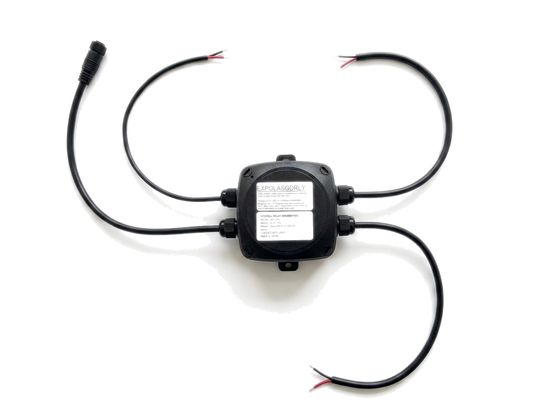
OLAS diesel engine stop relay box with its three pre-wired cables
Part numbersEXPOLASGDRLY single, EXPOLASGDRLY2 twin
RelaySPDT, 12V DC coil, 30A. Durakool DG56A-7011-76-1012 or direct equivalent
Power input12/24V DC
Stop circuit wire14 AWG (2.5mm²)
Power wire17 AWG (1mm²)
EnclosureIP66 polypropylene, 104 × 104 × 70mm, 83mm mounting centres
CablesPower 350mm, Guardian 420mm (750mm extension available), engine relay 350mm
Supplied2 × A4 stainless screws and washers, 4 × butt splices (14–16 AWG)
Temperature−10°C to +40°C

Control switch signals

SituationWhat you see and hear
Tracking, all OKSolid green
No tags in rangeGreen/red alternating, beeps increasing every minute
New tag trackedRed double flash, double beep
MOB alertConstant red, hub high red, beep every second
StandbySolid red
Tag battery under 20%Red flash every 10 seconds
Tag battery under 10%Beep every 5 minutes

If the switch isn't lit, Guardian has no power and the engine will not be cut. Check it's lit every time you go to sea.

Technical help

Ultimate Sports Engineering

Phone +44 (0)1798 839300 Sales olas@use.group Service service@use.group